Summary of Learning

Embedded above is my Summary of Learning video that I created using iMovie, Animoto, Phonto, and PicsArt. These are my final thoughts and what I have learned over the past four months squeezed into six minutes. I hope that you enjoy this video even half as much as I enjoyed this class.

Here is the script in case you would like to read along or would like to use it as a reference:

Hello everyone! My name is Sydney Kawa and this is my Ed Tech 300 Summary of Learning. I will be sharing information that I have learned throughout the past four months through slides that I have created and combined using iMovie, Animoto and other editing resources such as Phonto and PicsArt. Both iMovie and Animoto are resources that were recommended to me through Ed Tech 300, and have been put to use on many occasions throughout my learning project. Back in January I began my time in this course and quickly gained an understanding of the importance of using online tools to the best of my advantage. Before this course I did not have Twitter, Slack, or use many online tools that could be beneficial to me in the long run as a future educator. Now I am able to confidently say that I tweet multiple educational resources a week, engage with my peers through retweets and replies, comment on classmates blogs through WordPress, offer my opinions and suggestions through Slack, and put aside time everyday to absorb educational resources that my peers have also shared through these platforms. Before entering this course I primarily found myself scrolling through Instagram, sharing posts on Facebook, and pinning home decor ideas on Pinterest. I will admit that that was not very educational, however in my defence I never actually realized how reliant and important modern education is on technology. Ed Tech 300 immersed me everyday whether we were directly in class or not, and brought multiple tools to my attention. Not only tools that I can use to further my own learning, but the learning of others as well. Let me break them down for you. 

Twitter, which took me by surprise when we were asked to create an account. is actually used for much more than just following and retweeting celebrities posts (who knew). Rather for myself, it is a platform where I am able to follow other educators within Saskatchewan, partake in SaskEdChats on Thursday evenings, be introduced to Ed Tech resources that I may have missed in my own searches, and meet other students in the education program. The resources and daily usage of Twitter were a huge part of my Ed Tech Journey. 

Next we have Slack which allows us to also share resources, post reminders, ask questions, and share our thoughts. Slack was very immersive and if you needed a question answered you could rely on your fellow classmates to answer within minutes. With Slack I was able to rely on others and classmates were able to rely on me, a great example of us stepping up and being educators before we are even in our own classrooms. 

WordPress was the largest part of my learning experience and take away from Ed Tech 300. My blog, Sydney’s Inquires, is where I posted weekly learning updates and used educational resources to help guide my learning project, I also responded to blog prompts such as digital citizenship in the classroom, my thoughts on a resource called Feedly, YouTube/internet progression, fake news, looking back at our digital footprint, and much more! Each concept brings positives and negatives to light such as the benefits of coding, but the downfalls of cyber bullying. Both very different aspects of technology, but both are just as important to talk about in the classroom. My blog is also a hub that provides the viewer with more than just learning project updates. Over this course I have learned to polish and make my blog aesthetically pleasing while also providing, possibly my future boss and anyone that comes across my blog, with the following posts: about me, my educational resume, my educational philosophy, my favourite education based quotes, examples of lesson plans I have created, achievements, and course work from over the past three years. 

Ed Tech 300 has provided me with multiple tools, I am talking dozens! These tools include: a better understanding of technology and how to appropriately apply this method into the classroom, how to find reliable resources through blogs and twitter, technology tools such as iMovie, Canva, Anchor (which I have been diving into on my own time), Kahoot, Quizzes, an Hour of Code, and many more. I could not think of a better semester to take Ed Tech 300 as we used Zoom to meet every Wednesday evening, chatted through Slack, shared resources through Twitter, and poured our ideas and challenges into our blogs. Every single project and communication made over the past four months have only been through education technologies, and look at the relationships that have been made. I have learned that connection is more than just being together in person. We were all communicating from the comfort of our own homes, yet I have never felt so connected to a class before. That is the prime example for how important educational technologies are in 2021 and how I need to stay up to date and specifically make time to learn about these technologies so that I can pass valuable information onto my students. 

A few topics stood out to me throughout this semester. Starting with digital citizenship and the importance of being safe online. Referring to Ribbles Nine Elements of Digital Citizenship I as a future educator must not only take into account everything I post online, think before I hit send, and understand that anyone and everyone can have access to my online presence, but also educate my students on the positives and negatives on using online technologies and resources. Through allowing our students the opportunities to use educational technologies we are teaching them to be strong digital citizens as well as helping them understand other sides of the internet such as fake news. Students will need to be able to understand the difference between what is real and what is fake on the internet, an internet lie detector if you will, which can result in a much safer and positive relationship with the online world. By enhancing examples of real versus fake and allowing for students to see different aspects of the online world is beneficial, this needs to be introduced into the classroom in order to sustain a safe and healthy environment and the ever changing online world.

Lastly, I would like to say a quick thank you to Katia for the passion she emits into this course, and all courses I have taken with her thus far. It truly resonates with me and enables me to push myself into new ideas and resources every single week. The learning does not stop here, Ed Tech 300 has truly been a course of connection. 
Minecraft Treasure

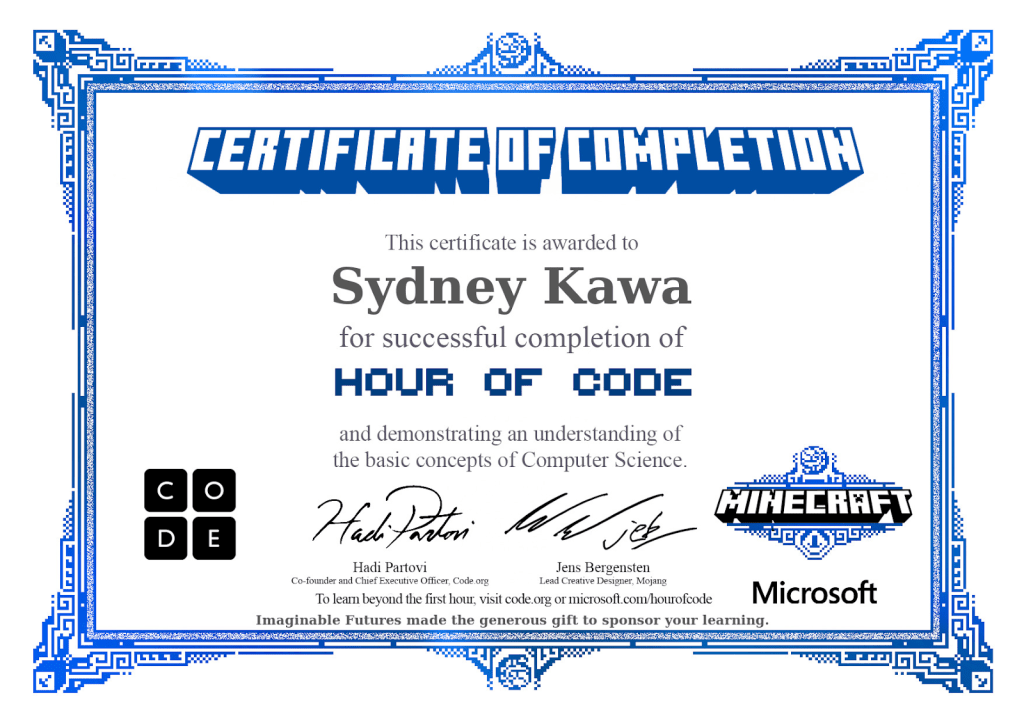
My Minecraft coding certificate! Yay!

Going into our blog prompt this week I can honestly say that I was very intimidated. I have never even had a conversation about code in my life, let alone actually perform coding a game myself. However, Code.org laid out all the steps with video prompts that definitely made the process much more enjoyable and successful for me. I chose to take part in the websites Hour of Code option and ended up coding my way through Minecraft’s Voyage Aquatic where I was able to win Minecraft treasure! It truly was an adventure as I was halfway through the experience and thought I was not going to make it to the end since half the time I was not sure whether to turn my character left or right. I also learned closer to the end of my coding process that you can delete one singular step in the code setup rather than the whole thing, which made everything work so much faster and I was able to fix my mistakes with ease.

My first ever code puzzle completed.

The theme of the game as well as the video instructions between certain levels were very clear and helpful, I also found the differing codes within the ‘blocks’ space to be appropriate to each puzzle and each served a purpose. I did not use every code that was offered, but if I were to go back and use code more often I would find use for them. At this point I was just trying to get a good understanding on how to complete the puzzles in the most strategic way, but if I were to be more adventurous with my avatar I would have found use for more of the codes. I also found Code.org to be useful in the sense of entertainment and themes. Some of the themes you are able to chose from on the website are Star Wars, Minecraft, Flappy Bird, Space Invaders, Frozen, Angry Bird, etc. Making this coding source great for all levels of education. As someone who has never experienced coding I did find this slightly difficult even though it was an elementary/middle school level of coding. However, for someone who has never coded before this was the perfect level of difficulty for me to both learn and also not want to give up on the experience.

If I can code, anyone can code!

Code is important, in specific, for elementary education as it allows for children to be creative, have a sense of being in control, to learn to be strategic, and experiment with different ideas and ways of coding. Even as a student in University I found the certificate at the end of the hour of coding to be both rewarding and fun, so imagine the motivation and accomplishment that a young student would feel completing their own hour of code. If coding is an activity that a student finds particularly rewarding it could benefit their future and their decisions on a career as an adult. As technology continues to progress, the need for computer/software programmers are in demand and it takes both math and coding skills to achieve these positions. It also shows children that math is not just being able to use a calculator, rather, it is propelling students to progress and have a larger sense of math and what makes it so important.

Contributing to the Learning Of Others

Over the past four months I have been contributing to others’ learning within our class, Introduction to Educational Technologies and Media 300. How fitting that we all ended up taking this class during a time where we have never relied on social media more to both connect us as human beings, and connect both teachers and students within classrooms during a global pandemic. This blog post will be dedicated to the contributions I have put forth through different social media sources such as: Slack, Twitter, and my own personal blog on WordPress through both posts and comments. Breaking each source into its own category, here is how I contributed to the learning of others.

Slack:

I had never used or even heard of Slack before entering this class! However, once I was introduced to it during the first week of the semester I knew it would be put to use and was hoping it would be effective. Overall I found it to be very useful and engaging. Not only was it fun to see everyones thoughts and favourite gifs being shared throughout the last four months, but it was very practical in the sense that you could ask a question and be certain that you would get an answer or two within at least fifteen minutes. I personally always kept my Slack notifications on so that if I saw a question that I knew the answer to I would be able to jump on it as quickly as I could, or at least offer my help out to another student. Here are some examples of my contribution on Slack:

Helping my peers with video editing.
Helping with technical difficulties and suggestions.
Resource sharing a Twitter chat called #GoalChat.

Twitter:

I had attempted to use Twitter back in middle/high school, however, I did not know how to properly utilize the website and opted to use Instagram instead. This resulted in me deleting my first ever Twitter account and then starting fresh for the class. Over the past few months I have gone from zero tweets to a total of 140 tweets and counting. In order to implement Twitter into my daily routine I set aside time every afternoon to either tweet out a resource or release a new blog post and share it through Twitter, as well as reply to others tweets within the hashtag edtc300. I also took part in three #SaskEdChats that allowed me to both share and read the opinions of other educators across Saskatchewan. It was a way to both become educated and understand that all voices are heard and our opinions within the #SaskEdChat are valued. Below is a scroll through of my Twitter account as well as some pictures that allow for you to see the work I have implemented onto Twitter.

Participating in #SaskEdChat
Sharing educational resources with classmates.
Replying to other #edtc300 students’ tweets.
Scroll through of my Twitter account/all of my tweets so far.

My Blog:

My blog consists of posts based on my sugar cookie and royal icing learning project, my thoughts and journey throughout EdTech 300, comments on others blog posts, and online resources that I used to guide my posts. Throughout my learning project I was able to share my favourite learning resources, create ping backs to other classmates and their blog posts, and create YouTube videos as well as a TikTok and an Instagram reel to include into my posts. I shared and cited educational resources that were listed with our EdTech 300 reading list, while discussing key concepts and implementing the highlighted ideas/suggestions into my own learning and future classroom.

Above this text is a document that holds all of the blog comments I have made to other classmates throughout the entire semester, it is organized from week one all the way to week ten! In some comments I even added resource links to information that I felt would benefit other students based on their blog post for the week. I highly enjoyed reading their weekly blog prompt ideas, seeing their embedded resources, reading their personal thoughts and triumphs during their learning projects, and being introduced to new ideas and a differing perspective from my own.

Embedding YouTube videos into my blog posts to help others understand my learning project on a more personal level through watching rather than always reading.
Adding both links and explaining step by step how to use Animoto to make it easier for others who are wanting to use this video editing software.
Embedding links to all the resources I found during my learning project in order to potentially help readers learn the same skills.
Commenting on Ian’s blog post with a YouTube video link that I believe to be a good resource to go along with his yoga learning project.

Throughout the past four months I have learned how to use numerous platforms to both help myself and others through our learning journeys. Through Twitter, Slack, and my own personal blog I have been able to aid peers through contributing to their personal learning. Through online resources such as YouTube videos, TikToks, Instagram reels, educational articles, weekly zoom classes, the Saskatchewan education curriculum, Feedly, etc., I have been able to support both my own learning while contributing to others within EdTech 300.

Justin Left Hailey for Selena?!

Do I have your attention? Great! Because the title is FAKE NEWS!

As you may or may not know, I am in the Elementary program, so approaching the subject of fake news and digital literacy will be different from those of you who are going to be teaching high school students or even University classes. Beginning with children who are so impressionable and believe things that they read or are told (up to a certain extent) need to be taught about fake news and digital literacy so that they are able to differentiate what sources are trustworthy and which sources simply, are not. The best way to ensure that students from kindergarten to grade five are able to tell the difference between fake news and educational articles is to look at past articles that that particular media outlet has released, this way you can tell if it is credible. Also, look at local news sources to see their opinions on larger news sources, and of course simply read the title of the article. For example, the title I placed on the top of this blog post probably is not very educational as it is based on particular people and judgement towards others where we have no place as individuals to judge, and it is none of your business! A question or middle ground statement will most likely be a good article as it is based on trust worthy sources and input from others who do not sway the reader to think a certain way, it just brings important information to light.

Of course, five year olds will not be able to understand or even read article titles if they are lengthy or have large words in them, let alone understand what the article is about based on its title. This needs to be the job of an adult to help guide children in order to figure out what kinds of literacy are actually beneficial to read. The article titled How do we teach students to identify fake news by Dr. Alec Couros and Katia Hildebrandt exclaims “Bring real-world fake news examples that we encounter everyday into the classroom so that students can be challenged to apply their skills and techniques to authentic situations” which as a future elementary educator is the best point made within the article for young students. They will need to be guided in order to fully understand the difference between real world real news and “fake news” beginning with articles that are not political, scary, or too stimulating. In order for them to understand, students will need to be introduced to articles that are more neutral and deal with topics such as new play structures or children’s story books.

Another way to intrigue younger children and immerse them within the subject of fake news and digital literacy is to do an activity that allows them to work as a class to find the article title that consists of fake news out of a list of four, three titles being true and one being the fake news. There is an online tool called Can you spot the fake news headline? that would also work very well for this as the website already has headlines created for you. Now, after trying the educational tool out on my own I would have to lead an elementary class through the headlines, but it gives educators a great outline for a quiz they could create on their own to make it more age appropriate and understandable for students. Some fake news headlines are not so straight forward, especially since you are only seeing the headline and not the whole article which usually gives it away. However, with that being said, being able to spot the fake news straight from the headline will save both you and your students time and a better understanding of credible sources.

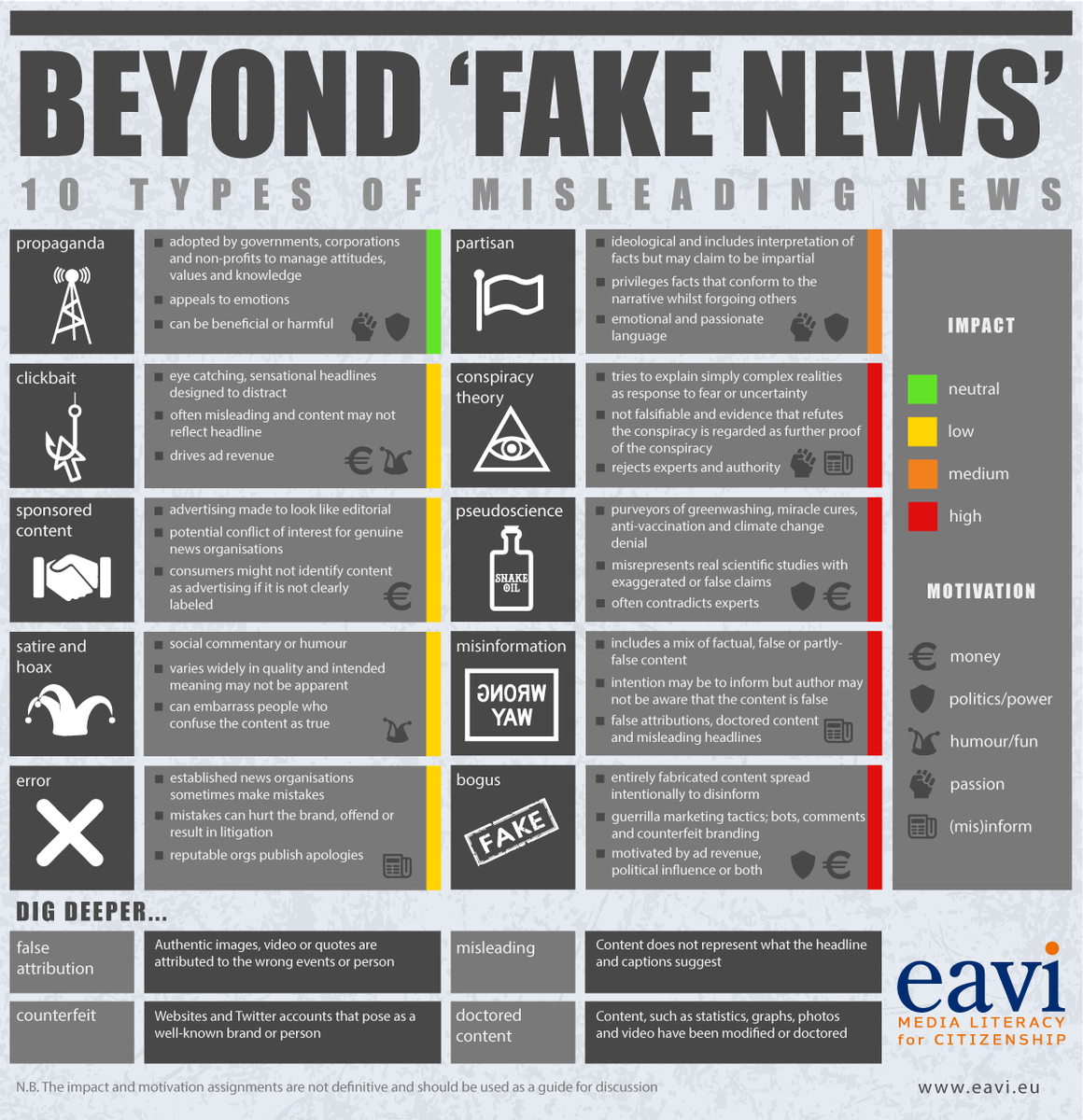
Since young students seem to be more visual and rely on visual aids I decided to incorporate a visual model into this post called “Beyond ‘Fake News‘”. This model is able to show children how and why it is important to be safe online, and to ensure that they understand the dangers of the online world without scaring them, rather, educating them. Overall, to understand how and why they are using technology and then how to use it appropriately. Through teaching children about the online world we are teaching them how to be safe, how to use a search engine, type, and educating them on their digital footprint. Why is this is important for children to understand? Because it nurtures responsible digital citizenship. These thoughts and statements support the NCTE Framework that states “delivering inaccurate information is dangerous. It’s not enough to be connected; we need to be accurate in our knowledge through these connections” by helping students both understand the dangers, but also the benefits of connection, which they have been experiencing at great lengths by using zoom to be apart of what would be their everyday classroom setting.

Digital literacy also ties into the Saskatchewan education curriculum specifically through the grade four English Language Arts outcomes and indicators as follows: CR3.2 View and respond to grade-appropriate visual and multimedia texts (including videos, cartoons, illustrations, diagrams, charts, maps, and posters) explaining reactions and connections as well as
visual features that convey humour, emotion, and mood. Indicator: d. Record facts and ideas from grade-appropriate visual and multimedia texts including DVD, television program, magazine, and reference resources. This example using both an outcome and indicator shows that even at a grade four level students are asked to look at multimedia texts, make sense of them, understand if they are true or false creations, and then record facts from resources both online and through other media such as magazines and television.

Mission: Cyber Sleuth

Over the past week our focus has been the ideas and understandings of our own digital identities, as well as others. To ensure that we, “we” as in future educators, understand the importance of digital identities we were asked to dig deep into someone else’s digital identity. In break out rooms (groups of five or so) we were asked to focus on someone within the faculty of education for a total time of twenty minutes and write down the following information: professional, biographical, personal, where they are on the web/social media based, our overall impressions, our trust that we have within the person based on their digital identity, and lastly what we would change about their online presence. Within a twenty minute timeframe we had information of all kinds ranging from a photo of their drivers license to what school they teach/coach at. It truly is a lot of information to have on the online world and can also be dangerous when you think about it. This information can be dangerous if it finds its way into the wrong hands. In a TED Talk given by Monica Lewinsky she states “There are no perimeters around how many people can publicly observe you and put you in a public stockade”, which really made me stop and think about how everything that is posted online can be accessed at any given moment by any given person, and they can do anything with that information. Key word: ANY.

Photo by Vlada Karpovich on Pexels.com

The point of “cyber sleuthing” in this particular case was to see what our digital identities look like from a different perspective. This assignment helps us see and understand from a fellow peers point of view what our future bosses, family members, students, students parents, and the world have access to and are able to see solely based on us as individuals. Personally, I have many forms of social media, including: Instagram, Facebook, Pinterest, a YouTube channel, Twitter, a blog (which you are currently visiting of course), Snapchat, and VSCO. In an article released by ESPN titled Split Image, the sad truth of social media and the affects it has on humans who face the negatives of social media and even, lose the fight. The article states “Everyone presents an edited version of life on social media. People share moments that reflect an ideal life, an ideal self”, which personally reigns to be true. I post photos that are posed, colour edited, and that show highlights of my life. I never post photos of me on my bad days when the past haunts my memories or when I am feeling down about body image. Rather, I post my highlight reel.

This week I was partnered with Presley Allen to “cyber sleuth” and in reality, I did not find much. In a quick Google search of Presley I found her Twitter account after scrolling over half a page down, I was also able to find her blog but I had to do so through the blog hub that is located on UR Courses, it was not something that Google helped me find. I also found her Facebook account but since I am not her friend on Facebook I am only able see when she changes her profile pictures which the last time was all the way back in 2018. Lastly, I found her YouTube channel which has nothing posted on her feed and her “about” section is left empty and unedited. I also ended up finding her VSCO, sadly it has been inactive since her last post back in the summer of 2019. I could not find an Instagram or Pinterest, my best guess is that the usernames are different from just her first and last name making it difficult to pinpoint. Leaving her digital footprint beyond clean, but also, does not tell me very much about who she is as an individual. I do not know her interests, where she graduated high school, the relationships she finds to be the most important, or what kinds of vacations she enjoys. The most insight I have on her life is her VSCO where it looks like she has a boyfriend, went out with her friends who appear to be holding an alcoholic beverage, and a little trip to Calgary back in 2017. However, since all of these posts are dated, her relationships and ideas may have changed by now. Two years can change a lot and she may have picked up a new hobby during the pandemic but we are not able to confirm this through her social media. I did also take a scroll through her “collection” on VSCO to help me understand what intrigues her enough to push the republish button and I found lots of quotes and images of her and friends on nights out, but the “cyber sleuthing” ends here.

Photo by cottonbro on Pexels.com

Sadly, I feel like I did not learn a significant amount of information on Presley as an individual. Whether she is purposely trying to keep her online presence slim to none, or if she simply does not enjoy using social media is her story to tell. I truly enjoyed trying to find information about Presley as a person as it became difficult at times and allowed me to think harder and try to dig deeper. Thank you for giving me a run for my money, Presley!

Digital Citizenship in the Classroom

First off, what exactly is digital citizenship? Personally, I had not even heard about digital citizenship until two weeks ago when I was checking the weekly outline for Educational Technologies 300. To break it down for you, digital citizenship is ones presence online and understanding that everything you post online can be seen and acknowledged by anyone and everyone who has access to the internet, and educating others based on this context. Making sure that you are making appropriate and smart decisions before hitting ‘post’ is a very important step. Not just your words but all the images, videos, comments, and shares that you are mindfully take part in everyday, is part of your digital citizenship. Now, it is not bad to have an online presence. In fact it is important in this day and age to have some social media platforms especially those that allow for your employer to get to know you and for others to see what you are essentially bringing into your workplace and your everyday lifestyle. Are you sharing photos of you going to the bar? Slightly problematic and may result in your losing a job. Are you sharing a #selfie at home while doing school work? Not-so problematic and no harm is done to yourself or others. Oversharing can also be a problem too. Your employer or your students parents (if you are an educator) will not appreciate you sharing your schools name, location and ESPECIALLY not your students anywhere on your timeline. Not only is this oversharing but it also impacts lives that are not your own.

Photo by Andrew Neel on Pexels.com

I would also like to introduce Ribble’s Nine Elements of Digital Citizenship, as they are both important and informative. The nine elements are as follows: digital access, digital commerce, digital communication and collaboration, digital etiquette, digital fluency, digital health and welfare, digital law, digital rights and responsibility, and digital security and privacy. So, with these nine elements being introduced to you, and allowing for you to read about what digital citizenship is in a small paragraph, let me ask you a question. In regards to everything you share, post, and the comments you make on other posts, would you be okay with all of those things combined to be posted on a billboard with your name and face next to it? Seriously think about it, and not just the posts you have made now but what about the posts and comments you made as a 13 year old? Always remember to think before you post and before you hit send! Would you want your grandma to see the posts you make on Instagram? Or would you be embarrassed? Again, think before you post! It may seem small once you post it, and you may only have thirty Twitter followers but in this day and age anything you post can be seen by thousands of people around the world.

Now, let’s connect the Saskatchewan Curriculum and Ribble’s Nine Elements of Digital Citizenship. I am in the Elementary Education program so here are some outcomes that I found in the Kindergarten to Grade 5 curriculum.

English Language Arts, Grade 1:

CC1.1 Compose and create a range of visual, multimedia, oral, and written texts that explore and present thoughts on:
• identity (e.g., Feelings)
• community (e.g., Neighbourhood)
• social responsibility (e.g., Plants and Trees).

Indicator: a. Use words, symbols, and other forms, including appropriate
technology, to express understanding of topics, themes, and issues
related to identity, community, and social responsibility.

Social Studies, Grade 3:

RW 3.3 Evaluate the ways in which technologies have impacted daily life.

Indicator: a. Recognize that technology includes more than electronics (i.e.,
paper, forging steel, manufacturing, vehicles, making cloth,
products created for construction).

English Language Arts, Grade 4:

CR4.2 View and respond to visual and multimedia texts (including graphs, charts, diagrams, maps, multimedia DVD, websites, television programs, advertisements, posters), explaining the creator’s technique and the
impact on viewers.

Indicators: a. Discuss visual experiences (e.g., what was seen and the
effectiveness). h. View a multimedia presentation and identify how the language, visual, and multimedia features (e.g., sound, colour, movement) are used to persuade.

Technology and Creative Thinking

Let us begin with a brief overview of YouTube and its large progression over the past sixteen years. YouTube is a video sharing platform that has gained popularity over the years and has become one of the most popular platforms on the internet. YouTube was first launched in the year 2005 and all began with a video titled ‘Me at the zoo‘ which lasts for a total of nineteen seconds and contains a man standing in front of a heard of elephants at the San Diego Zoo. Coming across a video title that actually has something to do with the content of a video nowadays is hard to come by especially since ‘clickbait’ has become a very common tool to get views and engagement on a video. YouTube has also created a platform for regular everyday people to create a name for themselves by uploading consistently on their own YouTube channels and gaining an audience based on their personalities and the creative ideas they come up with. When someone, such as myself, comes across a channel they enjoy they can subscribe to that person so that they are notified every time that channel uploads a new video. For example I am subscribed to a few channels and watch their videos every time they upload, and every time I watch a video they earn a view from me as well as Adsense from me watching the video and viewing the ads they have placed throughout. YouTube started as a platform to upload videos and turned into a website where users can earn thousands of dollars through brand sponsorships, AdScense, money per view, selling their own merchandise, and even creating their own brands, promoting it and then making money through this as well.

Now, when it comes to using YouTube as a tool within the classroom I find that it could be very useful as it holds great informative content that contains valuable information. Whether you are teaching or learning about anatomy, greek mythology, number theory, the history of Shakespeare, etc., there will always be content based on what you are searching for. As stated by Michael Wesch in the video An Anthropological Introduction to YouTube “9,232 hours of footage is uploaded everyday” meaning that all hours of footage are accessible to anyone who has access to YouTube, and this was statistics all the way back from the year 2008. Since then the footage per day being uploaded to the platform has changed to 720,000 hours a day which works out to 500 hours every minute. This is a lot of information to take in, but you may be wondering, how does YouTube as a whole effect teaching as well as the outcome of my future classroom?

As a future educator I see the benefits of bringing YouTube as a whole into my classroom, doing my research on the videos I present to my students, as well as make sure it will benefit the learning process for them as well. In Educational Technologies 300 we spoke about the good, the bad, and the ugly when it comes to social media. However, as an educator I hope to teach the importance of being safe on the internet, not just on YouTube but on all forms of the internet that students may come across or feel as though they should make a public account. These forms include Snapchat, Twitter, Instagram, Facebook, TikTok, and whichever new forms of social media are released within the years I teach. Twenty years from now the world of social media and the concept of the internet will not be the same as they are today, but how it will differ is beyond me at this time. When I was in elementary school we had a box television on a cart that also had a CD and VHS player, this was as close as we had been to getting information in video format, but the teacher would have to watch through movies and tapes just to find information that would be valuable to us as learners. Now teachers are able to put a certain topic into the YouTube search engine and they are given dozens of results and informational videos based on the search, which in my opinion is a great advantage.

There will always be advantages and disadvantages when it comes to the internet. We, as future educators, need to be aware of the trends, social media platforms that are taking off, what the students we are teaching are interested in, and how their presence online is affecting them personally. As for schools in general, from Kindergarten to University, I personally feel like technology has had a very strong and positive roll. Throughout the time we have had so far within the pandemic technology has allowed for classes to continue, for community to be built, and for us to stay connected even when we are apart from one another. We meet through zoom, hand in our assignments through school websites or email, connect through Twitter and Slack, and write out our thoughts on blog posts. Without technology this would not be possible. It helps each and every one of us as future educators in understanding how the world of education can still progress and benefit with technology. Now that we have each dealt with the negatives of a pandemic we will be able to carry out learning and be more educated on how to implement different platforms into our classroom diligently and appropriately.

To complete this blog post, let us share our favourite YouTube channels, they can be educational or channels you prefer to watch on your spare time, and a brief description. Maybe we will be able to connect through shared favourites or even be treated to a new channel that we have never discovered before! I will begin: Emma Chamberlain (vlog style, fashion, cooking), Mia Maples (home renovations, hauls, trends), Good Mythical Morning (taste tests, reviews, games). Please leave your top channels below! Thank you all for reading!

Twitterpated?

Hello everyone and welcome back to another blog post, this week my post will be focusing on the popular social media networking app called Twitter. Twitter is well known for its celebrity usage and even connecting/replying to some of your favourite celebrities. However, that is not the focus of todays post, rather we will be exploring the ideas and ways that Twitter as a platform can be beneficial to education students/teachers/and used as a professional tool!

At the beginning of January 2021 I began an Educational Technologies course through my university as part of my journey to becoming an elementary school teacher. Before taking this course I did not have a Twitter account, I knew about the app and how it worked but I did not find myself in need to create an account myself. Ed Tech however had us create our own accounts to help us stay connected and see the importance of surrounding ourselves with others in class, especially in a time where the closest we get to having a real conversation is through zoom once a week. Through my account I have learned how to connect with fellow peers, participated in a #SaskEdChat, posted my own tweets/links, responded to others within my class, and post links to each of my blog posts!

One of my absolute favourite parts about using Twitter is posting articles that I find. I find educational articles based on elementary education, mental health, ways to use technology in the classroom, and other education tips and tricks that I would be happy to incorporate into my own classroom in the future. Most of the resources that I share I wish my teachers would have used in the classroom to benefit us as students. Once I tweet the links to the articles with the hashtag #EDTC300 other students in the same class, along with the professors, are able to not only read the articles but also reply to my tweets with their personal opinions on the topics and how they feel towards using the shared strategies as well. In about a year (hopefully) I will be working in an elementary school and I am looking forward to using my Twitter account to connect with other teachers both in Saskatchewan and Canada as it will be beneficial to see their classroom adventures and preferred techniques.

Last week I took part in a #SaskEdChat on Twitter, viewing the participation in a professional developmental experience I feel as though it benefitted me widely. After being able to reflect on the experience I found myself thinking hard about the answers to my questions, while also having fun and putting honesty behind my answers as well. Not only students from my course took part, but teachers and students from other classes took part. This was useful to me as I was able to see answers from all walks of life and all levels of professionalism. Each tweet sent into the #SaskEdChat was eye opening and allowed me to expand my own answers and even “heart” tweets that I wanted to look back on later. I highly enjoyed it and plan on joining again next week as a new topic is introduced and explored in depth.

I hope that you all enjoyed today blog post, and I hope to see you all back again to read my next one! Stay warm out there, spring is coming!

My own Twitter feed, my handle is @Sydney_kawa and is always linked in my posts!

Feedly and Blog Appreciation

I have had this blog since my first semester of University back in September of 2018, so if you take a look around my site you will be able to see how I have grown both as a student and future educator. However, I never truly realized how many blogs were being contributed to every week with followers who were invested in the information and resources that the creator had to share. Not only are blog creators sharing useful resources, models, ideas, integrations, etc., but they are also sharing the positives and negatives that go along with each one. For example, if a blog is sharing a link with you based on a professional site that speaks about classroom management, the creator of the blog can recommend that specific website to you and then educate the reader on how it personally worked for them and their classroom. I find this intriguing and informative as the reader is able to benefit from both a resource and personal experience.

Over the past several days I have been exploring Feedly and finding educational blogs that would best support me in my future classroom while also benefiting me as a student. It took me some pondering and google searches to truly understand how to find blogs that would pertain to me, as a simple search of ‘Elementary Education’ and ‘Educational Technologies’ was not going to cut it. Once I began to become successful with my search and appropriate topics arose I found myself reading off of several blogs a day, officially narrowing it down to my preferred topics and creators. I chose this content based on which blogs would personally benefit me in the long run, allow me to grow and learn with each post, and incorporate strategies that I want to add into my own classroom. I also found it important to focus on not only the blogs information but also its relevancy, followers, the number of posts per month, and just how active they are with updating resources and answering comments under their posts. Within Feedly I have created two categories.

A screenshot of my two separate categories along with the blogs I have followed in their proper places!

First I have the Elementary Education category that has three blogs listed beneath it: Ashleighs Education Journey (teaching resources, active account, multiple posts a month, a good following, math/social distancing resources), Elementary Matters (research based models, ideas, resources, active account, classroom management, focuses on grades 1-3), and The Inclusive Class (strategies, teaching students with disabilities, inclusion, active account). Each of these accounts carry knowledge and instruction that can be implemented into both my present and future. The other category I found most suitable to create is the Ed Tech category which also displays three enriching blogs: iLearn Technology (integrating technology into the classroom, benefits of using technology/online resources, active account with a very high following, all grade levels included), Edutopia (resources for teachers, students, administrators, parents, etc., project based learning, successful practices, enables connection between educators), and Cult of Pedagogy (theory and thinking as educators, classroom management, teaching practices, multiple resources: videos, podcast, store, blog, etc).

Focusing on iLearn Technology in particular, I have decided to follow this blog for a series of reasons. Like I mentioned previously iLearn Technology has many benefits such as incorporating and support information/resources for all grade levels from elementary education all the way to secondary education. So, not only is this blog supporting me at this particular moment in time as a student, but it also supports me once I have achieved my goal to become an elementary educator. How notable is iLearn Technology that I am able use it as a student and then pass it on to my own very young students within only a matter of a year and a half! The sources that iLearn Technology holds is relevant (especially during the global pandemic) as it supports educators with proper resources to allow for suitable and beneficial interactions with students both inside and out of the classroom. Which is very important both now and in ten years, as connection benefits our ability to learn and grow at a high rate.

EDTC 300 Self Introduction

Hello everyone and welcome to, or back to my blog! My name is Sydney Kawa and on this platform you can expect to see weekly updates on my weekly learning project alongside professional posts I have created during my journey to becoming an elementary school teacher. I am currently in my third year second semester of the elementary education program, and am taking many classes including EDTC 300 (Introduction to Educational Technologies and Media).

When it comes to educational technology I can honestly say that I do not have a diverse understanding or great knowledge on the subject. In fact, this is my first time creating a Twitter account that allows me to be surrounded by other educators and education students and see in real time what is happening in the education world within Saskatchewan and Canada as a whole. I have never followed news sources that automatically connect me to new information in Saskatchewan’s education system and was not able to see what others, who are enrolled in the same program as myself, have been encountering/encouraging. I feel like EDTC 300, as a class, is bringing me closer to my peers as well as real life events that take place within a very important field of my own life.

This is my third year blogging, if you dig deep (or simply click on the menus I have created at the top of my blog) you will be able to see posts that I made back in my first year, first semester of University! I truly enjoy the process and am working on making my blog space more enjoyable to look at aesthetically and am still learning new ways to create an organized space where others can come and learn about who I am and the projects I am currently working on. Along with enjoying the blog process itself I also find it very intriguing to read about my peers who are also taking EDTC 300 at the moment as well. Since we are not all sitting in a class together at this moment in time, due to the global pandemic, I find reading others blog posts bring me closer to knowing them and learning about who they are along with their interests and skills. Along with research I have completed on my own to further enrich myself I have found many sources including 20 Tools for Online Teaching which I personally found interesting and of appropriate use during this time.

An online source that I came across upon further research.

I hope that you all enjoy my weekly blog posts and are able to learn about me, as well as come along on my journey of learning how to perfect both sugar cookies and decorating with royal icing! It is so nice to meet you all and be part of our own blog community, I cannot wait to read about you all as well!

A photo of me so you can put a face to the blog! Hello everyone!